Circuit Browser: find the paths between neuron types
The Circuit Browser now finds the strongest paths between neuron types as well as individual neurons, searches five connectomes at once, and draws each path so it can be read at a glance.
The Circuit Browser answers one question: how does one neuron reach another? You give it a start and an end, and it returns the strongest chains of synaptic connections between them. Until now both ends had to be individual neurons from a connectome. It now works with neuron types too, so you can ask how LPLC2 neurons reach the giant fiber without first choosing which LPLC2 neuron you mean.
Open the Circuit Browser (or choose Tools > Circuit Browser on the VFB site).
An example: from looming detector to escape neuron
LPLC2 neurons in the optic lobe respond to looming objects, and the giant fiber neuron (DNp01) triggers the fly’s escape take-off. Enter LPLC2 as the start and giant fiber neuron as the end, and run the query:
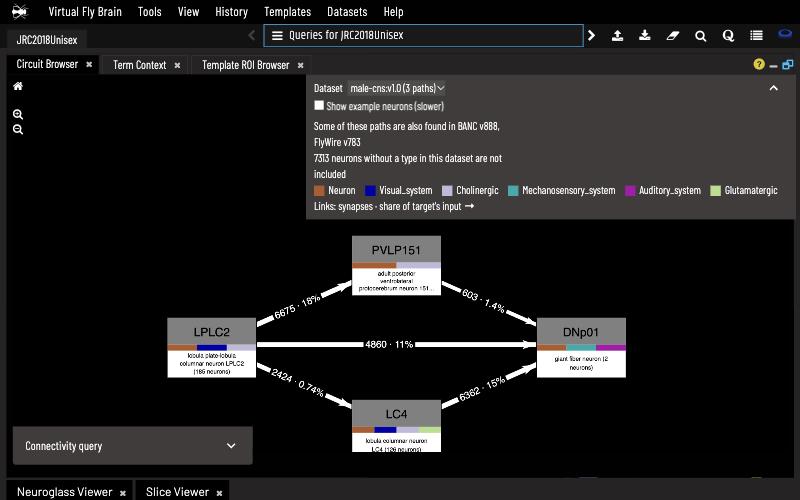
The three strongest paths from LPLC2 to the giant fiber neuron in the male CNS connectome.
Each card is a neuron type, with its short name, its full name and the number of neurons of that type in the connectome. Each link shows the number of synapses and the share of the receiving type’s input that they make up. Here 185 LPLC2 neurons make 4,860 synapses directly onto the giant fiber neurons, 11% of all their input. Two more paths run through one other type each, PVLP151 and LC4.
What you can do with it
- Find the route between two types. The direct link, if there is one, and the strongest indirect routes, up to six paths.
- Compare connectomes. One search covers BANC, FlyWire, the male CNS, the optic lobe and MANC. Pick the connectome from the Dataset list in the key; the key also tells you when the same path turns up in the others.
- Go from types to cells. Tick Show example neurons to see the individual neurons behind each path.
- Mix levels. Put a neuron at one end and a type at the other. The search then runs between neurons, using every neuron of the type you named.
- Carry on from a result. Click a card to open that type or neuron in Term Info, with its images, queries and references.
What is new
Search for neuron types
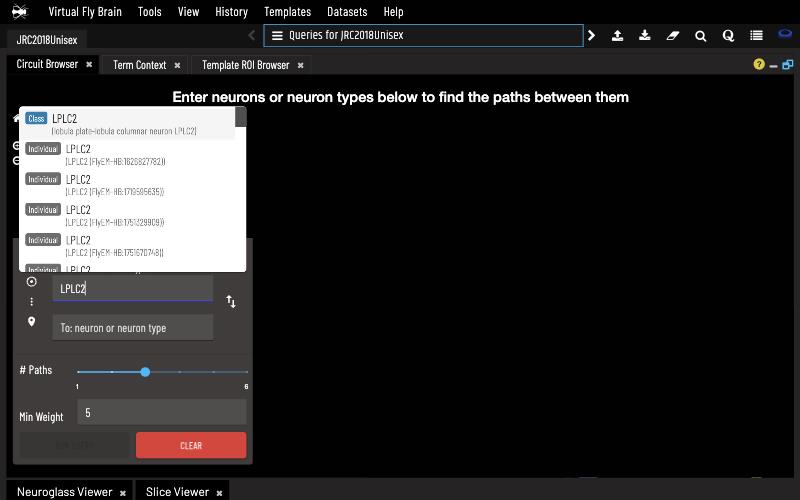
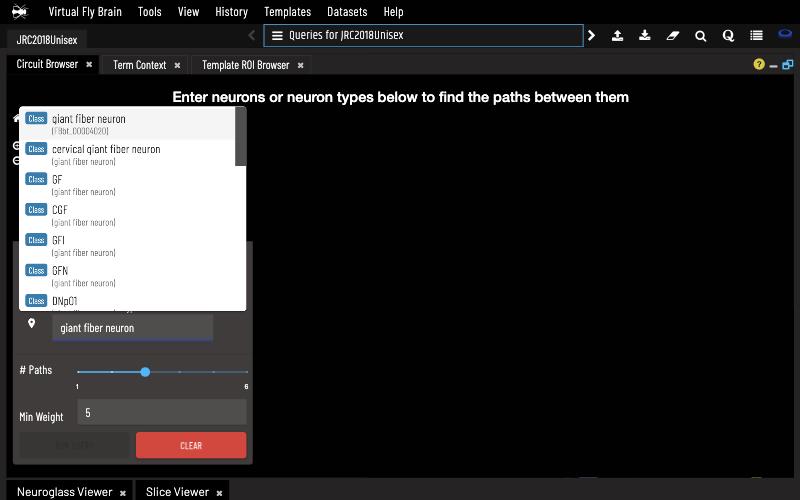
Both fields accept a neuron type or a neuron. Results are tagged Class or Individual, and each shows the name that matched over its full label. Synonyms work, so GF, GFN and DNp01 all find the giant fiber neuron:
A broad type, such as Kenyon cell, stands for all the specific types beneath it. Types with no neurons in any connectome are listed last and cannot be chosen, as they have no paths.
Every connectome in one search
The class-level graphs are built for each connectome at every VFB data release. A search runs in all of them and the results stay separate, one connectome at a time, so synapse counts from different datasets are never mixed. The key says how many neurons in that connectome have no type yet; those neurons are left out of paths between types.
Example neurons
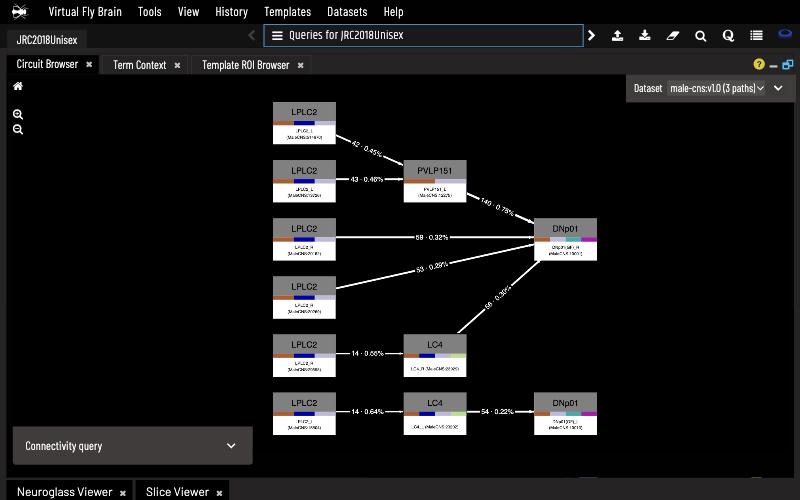
Example neurons for each path, with the key and the query box folded away.
Show example neurons replaces each path between types with its best chains of individual neurons, each stepping from a neuron of one type to a neuron of the next. It is slower, and on a large query some paths may come back without examples.
A clearer graph
- Each path has its own lane. A direct link runs straight across the middle, with the other paths above and below.
- Links never run behind a card, and their labels are placed clear of the cards and of each other.
- The key and the query box both fold away, and the graph refits when they do.
- In a tall, narrow panel the graph is drawn top to bottom.
- The Circuit layout in the View menu gives the Circuit Browser most of the window.
How paths are ranked
A link’s strength is its share of the receiving neuron’s or type’s input. A path’s strength is those shares multiplied together, so one weak link makes a weak path. In the example, the direct link scores 0.11. The path through PVLP151 scores 0.18 × 0.014, about 0.0025, and the path through LC4 scores 0.0074 × 0.15, about 0.0011. Min Weight sets the fewest synapses a link needs to be used at all (5 by default).
From code or from chat
The same search is available without the website:
- API:
https://api.virtualflybrain.org/circuit_paths?source=FBbt_00111763&target=FBbt_00004020&k=3returns the paths above as JSON, for every connectome. - AI assistants: the
find_circuit_pathstool in the VFB MCP server gives the same results to any assistant connected to it, including VFB chat.
Try it
Open the Circuit Browser, or read the Circuit Browser documentation. If something looks wrong or is hard to use, tell us with Help > Report an issue.